Run every solar project from first lead to commissioning
SolarSuite brings rooftop design, BOM and quotations, a six-phase project workflow,
GST-ready accounting and inventory into one workspace, so your team stops juggling
spreadsheets, chat threads and separate apps.
Engineering, sales, site work and accounts usually live in different tools. In SolarSuite they share the same project, so data entered once flows everywhere it is needed.
Six phases that mirror how solar projects actually run
Each project moves through the same stages your team already works in. SolarSuite creates the right tasks for every phase, so nothing between the site visit and the final invoice gets missed.
Phase 1 · New
Capture the lead and survey the site
Every enquiry becomes a project with its type, scope of work and planned capacity. The site visit feeds structured site, roof, system, generator and transformer details, so engineering starts from facts instead of phone notes.
Residential, commercial and industrial projects
Roof type, direction and sheet profile on record
LT/HT incomer, breaker, cable and voltage details
Tasks
New phase
Task
Assignee
Priority
Status
Site Visit
A
High
Completed
Collect Project Details
D
Medium
Ongoing
Mark phase as completed
Phase 2 · Engineering
Design, count and quote in one pass
Trace the roof on satellite imagery, build the bill of materials from your product database (or copy it from a similar project) and turn it into a branded quotation.
Rooftop designer with live measurements
BOM with GST and residential subsidy worked out
Quotation PDF with payback and EMI scenarios
Tasks
Engineering phase
Task
Assignee
Priority
Status
Design
A
High
Completed
BOM Counting
D
High
Ongoing
Quotation Generation
T
Medium
ToDo
Mark phase as completed
Phase 3 · Selling
Follow up until it is signed
Proposal revisions, follow-up notes and next-contact dates stay on the project. When the customer says yes, the sales confirmation records the work order and the advance payment in accounting.
Follow-up history with the next follow-up date
Advance payment recorded against the customer
No deal lives only in someone's phone
Tasks
Selling phase
Task
Assignee
Priority
Status
Proposal Revisions
A
Medium
Completed
Follow Up
D
High
Ongoing
Sales Confirmation / Work Order
A
Critical
ToDo
Mark phase as completed
Phase 4 · Installation
Approvals, material and logistics on schedule
Government approvals are set up from the project type, each with its own due date. Purchase material against the BOM, run quality checks and plan delivery to site while stock levels update.
Approval checklist with due dates
Purchase and delivery linked to the project
Inventory stays in sync with what leaves the store
Tasks
Installation phase
Task
Assignee
Priority
Status
Government Approvals
T
High
Ongoing
Material Purchase
D
High
Completed
Quality Check
A
Medium
ToDo
Delivery & Logistics
T
Medium
ToDo
Mark phase as completed
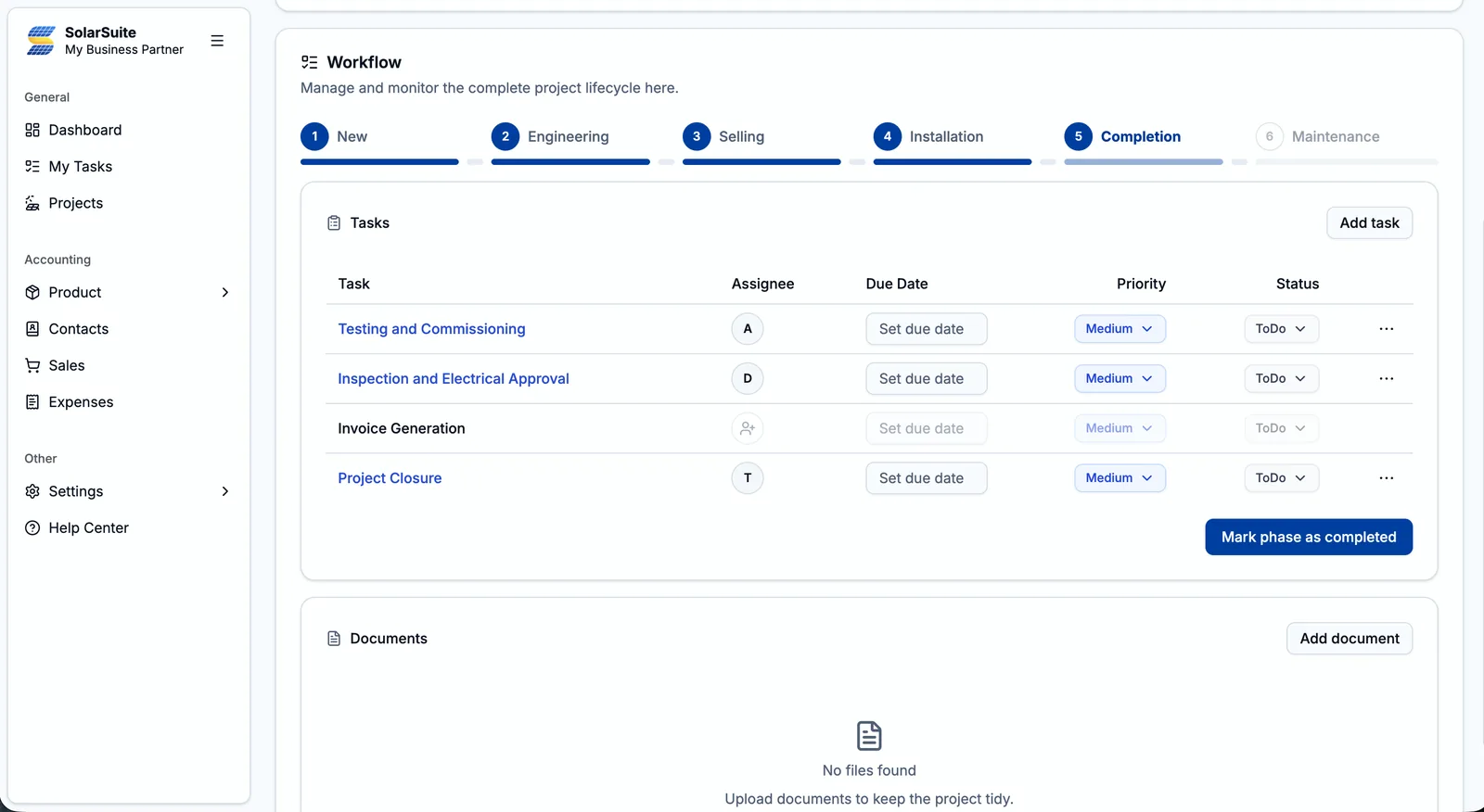
Phase 5 · Completion
Commission, invoice and close
Record testing and commissioning, inspection and electrical approval, raise the final invoice and close the project with every document filed under the phase it belongs to.
Invoices raised from the project
Phase-wise documents, including DWG and DXF drawings
A timeline of every change on the project
Tasks
Completion phase
Task
Assignee
Priority
Status
Testing and Commissioning
A
Medium
ToDo
Inspection and Electrical Approval
D
Medium
ToDo
Invoice Generation
+
Medium
ToDo
Project Closure
T
Medium
ToDo
Mark phase as completed
Phase 6 · Maintenance
Stay close after handover
Move the project into maintenance to schedule monitoring and maintenance visits, with the customer's full history one click away when they call.
Monitoring and maintenance tasks
Complete project history in one place
Same team, same task board
Tasks
Maintenance phase
Task
Assignee
Priority
Status
Monitoring
D
Low
Ongoing
Maintenance Activity
T
Medium
ToDo
Mark phase as completed
Solar rooftop designer
Size the roof from satellite imagery before you climb it
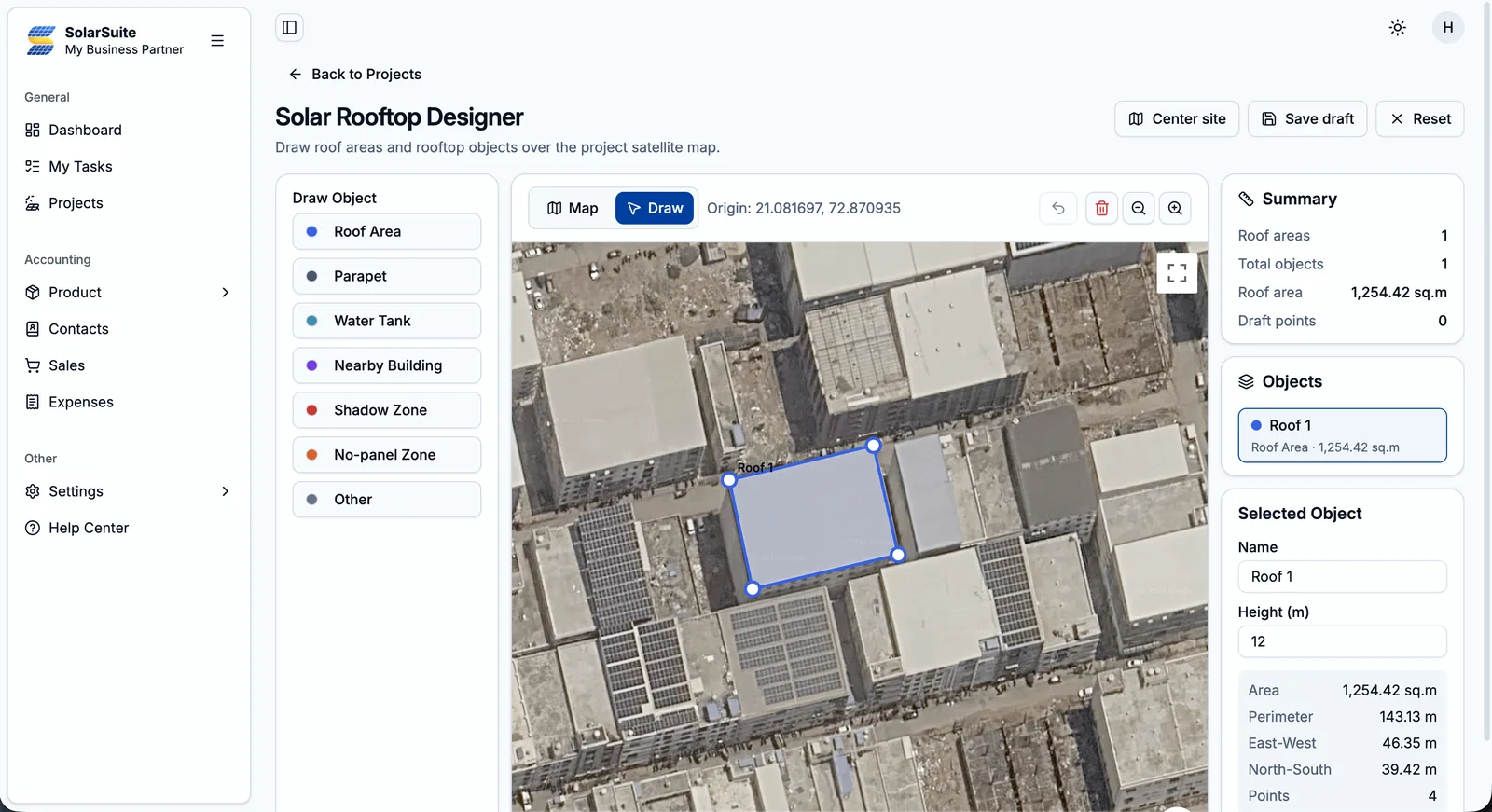
Open any project on its satellite map and trace the usable roof point by point. Mark everything that affects the layout, set heights, and get exact measurements that feed straight into roof details and the BOM.
Roof Area
Parapet
Water Tank
Nearby Building
Shadow Zone
No-panel Zone
Other
Area & perimeterCalculated live as you draw
East-west / north-southRoof dimensions in metres
Heights per objectParapets, tanks and neighbours
Saved draftsPick up where you left off
Roof traced on the project's satellite map, with live measurements.
BOM & quotations
Quotations that answer the customer's real questions
Build the bill of materials from your product catalogue, then generate a proposal that shows the price after subsidy, when the system pays for itself and what a loan would cost, all under your own brand.
BOM from your catalogue, or copied from a similar project
Residential subsidy and GST worked out for you
Payback with tariff escalation, maintenance and panel degradation
Loan scenarios with owner equity, interest rate and tenure
Your cover letter, header, footer, terms and portfolio in the PDF
Revisions and follow-ups tracked on the project
Proposal · 5 kW rooftop
Residential · Grid connected
Sample
Subsidy
₹78,000
Year-1 generation
7,300 units
Payback
~5.7 yrs
Cumulative savings vs. net cost of ₹2,22,000
Loan option · 70% financed at 10% for 10 years₹33,302 / year
Illustrative 5 kW system at ₹3,00,000 using SolarSuite's default assumptions: 4 units/kW/day, ₹5.50/unit tariff rising 3% a year, 0.8% annual panel degradation and 1% maintenance.
Accounting & inventory
Your books and your stock, connected to every project
Sales confirmation records the advance, material purchase raises the purchase order, delivery raises the challan and invoice generation raises the invoice, all from the project your team is already working in.
GST-ready accounting
Every sales and purchase document with GST tax rates, numbering and a downloadable PDF, formatted the Indian way in lakhs and crores.
Sales
Estimates
Delivery challans
Invoices
Payments received
Credit notes
Purchase
Purchase orders
Bills
Debit notes
Payments made
Money
Expenses
Recurring expenses
Bank accounts
Customers & vendors
Inventory & products
One product database for BOMs, purchases and sales, with stock that stays accurate as material moves between your store and project sites.
Catalogue
Products & variants
Categories
Manufacturers
Units
Stock
Opening stock
Stock adjustments
Inventory log
Returns from projects
Team & control
Everyone knows what to do next. You decide who sees what.
Give site engineers, designers, sales and accounts their own view of the work, with permissions you set module by module.
My Tasks
Every assignment across all projects in one list, with priority from Low to Critical, due date and status.
Roles & permissions
Create roles and choose view, add, edit or delete access for projects, accounting, products and settings.
Team invites
Invite teammates by email and they land in the right role from their first sign-in.
Government approvals
An approvals checklist created from the project type, each item with its own status and due date.
Phase-wise documents
Store photos, PDFs, DWG and DXF drawings, Word and Excel files against the phase they belong to.
Project timeline
A running log of what changed on each project, in which phase and by whom.
Why teams switch
From scattered tools to one source of truth
Without SolarSuite
BOM in one spreadsheet, quotation in another
Tasks and approvals chased over calls and chat
Roof size unknown until someone visits with a tape
Invoices and stock in separate software
Nobody sure which phase a project is in
With SolarSuite
BOM feeds the quotation, purchase and invoice
Every task has an owner, due date and priority
Roof traced and measured from satellite imagery
Sales, purchase, expenses and stock in the same app
Each project shows its phase at a glance
Pricing
Start free, grow when your team does
Start with a 2-month free trial, then pick the plan that fits your team.
Solar EPC companies, installers, consultants, designers and BOS traders working on residential, commercial or industrial projects. If your team takes a project from enquiry to commissioning, SolarSuite gives everyone one place to run it.
Can I design a rooftop before visiting the site?
Yes. The Solar Rooftop Designer lets you trace roof areas on the project's satellite map and mark parapets, water tanks, nearby buildings, shadow zones and no-panel zones. Area, perimeter and east-west / north-south dimensions are calculated as you draw.
Do quotations include subsidy, payback and loan calculations?
Quotations are built from the project's bill of materials. SolarSuite works out the residential subsidy (₹30,000 per kW, capped at ₹78,000), projects payback using tariff escalation, maintenance cost and panel degradation, and shows loan and EMI scenarios. Your cover letter, header, footer, terms and portfolio are added to the PDF.
Does SolarSuite handle GST and accounting?
Yes. Create estimates, delivery challans, invoices, credit notes, purchase orders, bills, debit notes, payments and expenses, including recurring ones, with GST tax rates, bank accounts and customer and vendor contacts. Sales and purchase documents download as PDFs.
Can I control what each team member can see and do?
Yes. Invite teammates by email and, on plans with role-based access, give each role module-level permissions to view, add, edit or delete, so site engineers see their tasks while accounts stays with the accounts team.
How much does SolarSuite cost?
Start with the free Trial plan for 2 months, covering up to 2 users and 5 projects. Paid plans: Pro is ₹9,999 per year with up to 20 users and unlimited projects.
Bring your next solar project into SolarSuite
Create your company, invite your team and move your first project from lead to commissioning in one place.
 SolarSuite